Web Change Detection 101: How to Monitor a Website for Changes in 2026

TL;DR
- To monitor a website for changes, web change detection snapshots a page on a schedule, compares each new snapshot to the last, and notifies you when the content changes.
- Five core methods cover most setups, including hash diffing, DOM element diffing, text and markdown diffing, visual diffing, and semantic diffing where a model decides if a change is meaningful.
- Monitoring pipelines break in three ways: dynamic elements like ad rotators and timestamps trigger false alerts, JavaScript rendering hides content from a plain HTTP fetch, and diffing every change causes alert fatigue.
- Two use cases drive most modern setups: competitive intelligence (pricing and positioning) and AI freshness (keeping a retrieval index or an agent grounded in current web data).
- For developers: point an endpoint at a URL, describe the goal in plain language, and route the result to a webhook.
This guide walks through what website change monitoring is, how the five detection methods compare, what breaks in production, and how to monitor a website for changes with a few lines of code.
What is web change detection?
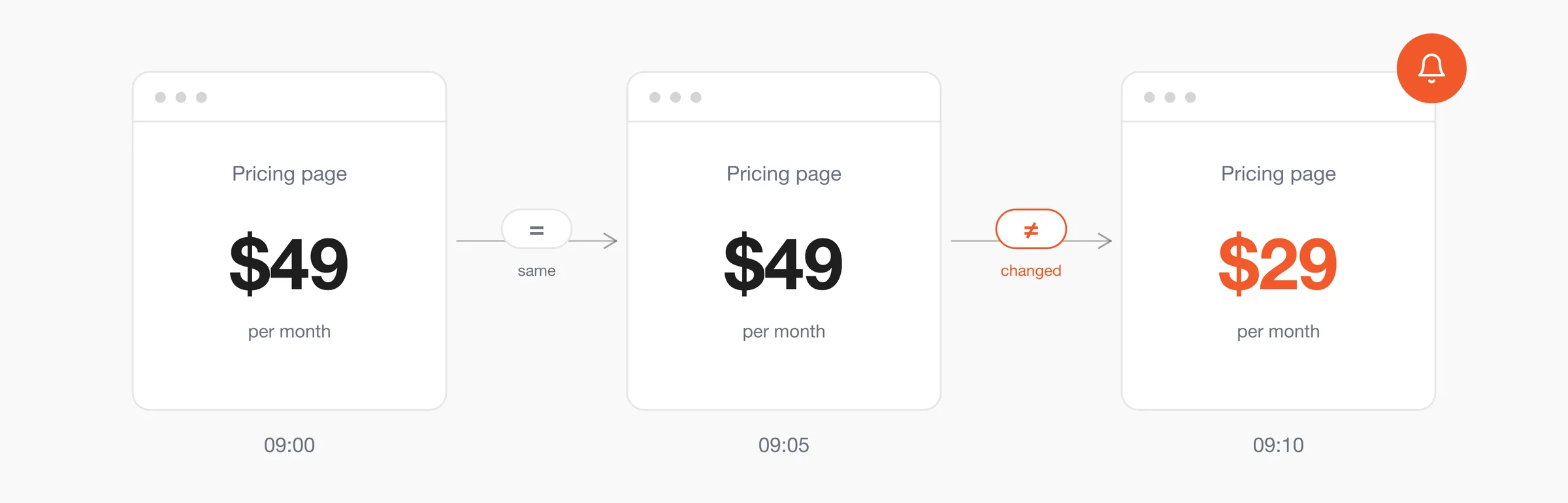
Web change detection is a system that watches a web page and tells you when its content changes. It fetches the page on a schedule, stores a snapshot, compares the newest version against the previous one, and fires a notification when the difference crosses whatever threshold you set. It is also called website change monitoring.
Uptime monitoring and change detection answer different questions. Uptime monitoring tells you whether the server is responding. Change detection tells you whether the content, structure, or meaning of a page changed, and whether that is something you need to act on.
You can watch for several types of signals:
| Signal type | Question it answers | Example |
|---|---|---|
| Uptime | Is the server responding | The status page shows a 200, the site is reachable |
| Content change | Did the visible text change | A pricing number went from $49 to $29 |
| Structural change | Did the page layout or DOM change | A product grid moved, breaking your scraper's selectors |
| Semantic change | Did the meaning shift | A policy page softened its refund language |
What kinds of website changes should you monitor?
The five most common kinds of change to monitor:
- Content edits: Documentation, terms and conditions, and blog posts. A change to a single clause on a terms page can require an immediate legal and customer response.
- Price and inventory changes: A price change or a stock-status update on a product page directly affects any quote a sales team has prepared against it. Amazon revises prices more than 2.5 million times a day, and popular items can change as often as every 10 minutes, so a quote can become inaccurate within hours.
- Feature launches: A new product page, a new pricing tier, or an updated comparison table can change how buyers evaluate an entire category.
- Metadata: Title tags, meta descriptions, and schema markup decide how a page shows up in search results, and a rewrite is often the first sign a competitor is targeting a new keyword.
- Semantic tone shifts: Policy language, taglines, and positioning copy can change meaning without changing much text, and the new wording can signal a change in strategy.
Who monitors websites, and why?
Six teams rely on website change monitoring, each for a different signal:
- Developers: Keep a retrieval index fresh by re-crawling URLs the moment they change.
- AI engineers: Keep agents from quoting stale prices or retired endpoints. One engineer who let a RAG index sit for 13 months found 69.96% of chunks failed at least one staleness check.
- Competitive intelligence: Track pricing and positioning as soon as it changes. A Crayon-backed survey puts the cost of missed competitor moves at $2 to $10 million a year for average companies.
- SEO: Watch competitor metadata edits and content refreshes as early signals of where a rival is investing.
- Compliance and legal: Catch terms-of-service and disclosure changes before a customer or auditor does.
- Security: Detect unauthorized edits, defacement, and tampering before they surface elsewhere.
How does web change detection work?
Every web change detector runs the same five stages in order:
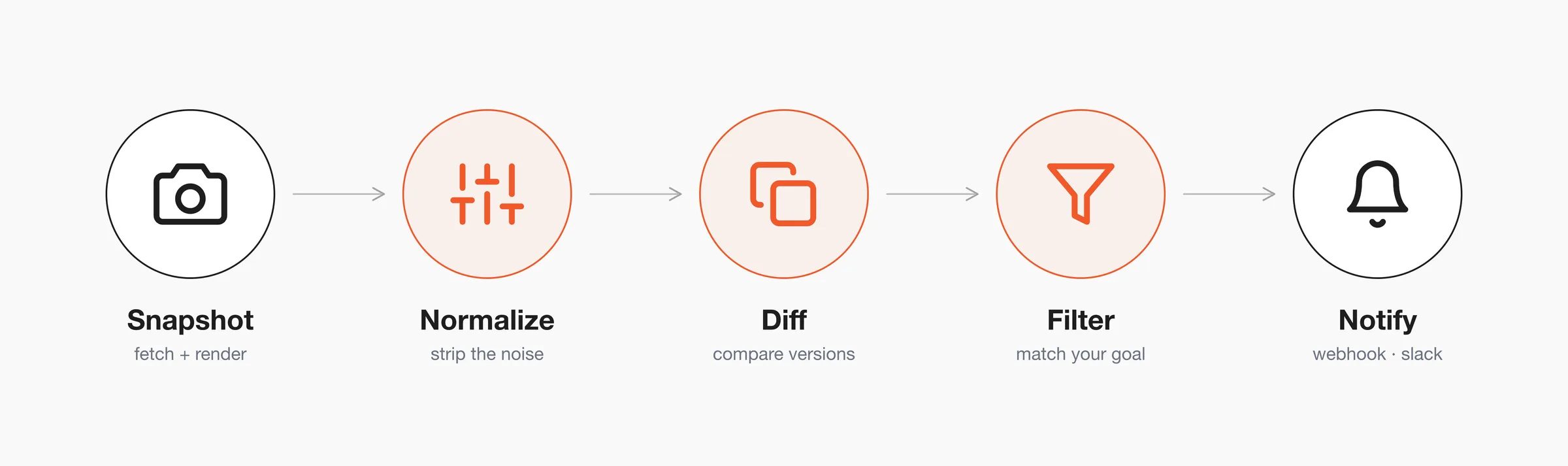
- Snapshot: Fetch the page and save its current state. If the page needs JavaScript to render, this stage has to run a browser because the raw HTTP response won't match what a user sees.
- Normalize: Strip out the parts that change on every load but carry no real change, such as session ids, timestamps, CSRF tokens, and rotating ad slots.
- Diff: Compare the new snapshot against the previous one. This can be a byte comparison, a DOM comparison, a text comparison, or a model reading both versions for semantic differences. The method you pick decides what counts as a change.
- Filter: Decide whether the difference is the one you asked about. For example, a price drop on the pricing page would qualify while an always updating sale countdown on the same page would not.
- Notify: Send the result somewhere your code or a team can act on it, like a webhook, a Slack message, or an email.
What are the five change detection methods?
There are five, each suited to a different kind of page: hash diffing, DOM element diffing, text and markdown diffing, visual diffing, and semantic diffing.
| Method | How it works | Best for | Breaks on |
|---|---|---|---|
| Hash / checksum diff | Hash the full page, compare hashes | Static pages that rarely change | Any timestamp or counter, which changes the hash every time |
| DOM element diff | Watch one region by CSS selector | Structured pages with a stable layout | Layout changes that move or rename the element |
| Text / markdown diff | Convert the page to text, diff the text | Content-heavy pages like docs and articles | Telling literal edits apart from noise |
| Visual / screenshot diff | Render the page, compare pixels | Landing pages and marketing sites | JavaScript timing and font loading, which cause false positives |
| Semantic / AI diff | A model reads both versions and judges meaning | Modern pages where you want only meaningful changes | Cost and latency per check |
No single method is right for every page. The best fit depends on your use case, how the page is built, how noisy it is, and how much time and money you can spend per check.
Where does website change monitoring break in production?
Three failure modes come up repeatedly:
- False positives from dynamic page elements.
- JavaScript rendering that hides content from a plain HTTP fetch.
- Alert fatigue from being pinged on every change.
1. False positives from dynamic page elements
On G2, "False Alerts" and "False Positives" are among the most common phrases in Visualping reviews. One reviewer described their daily reality as "Elements such as cookie banners, rotary ads, automatic update dates, or design A/B tests often trigger the tracker, sending alerts when the core content hasn't really changed". The same complaint shows up across screenshot-based tools whenever a page has moving elements.
On r/webscraping, jcrowe noted that "most pages are dynamic, so there will be changes to the html even if the content doesn't change much", which is why hash or full-page diffs fail unless you target the critical fields. helphp ran into timestamp noise on a news site where refreshing the page changed the displayed timestamp even when the article list had not meaningfully updated.
Solution: diff a target region instead of the whole page. Watch the fields you find relevant, like the price inside a specific container, or use a method that filters the rest before it reaches your notification channel. Firecrawl's
/monitortakes this further: describe the change you want to listen to in plain language and its AI judge ignores the ad rotations and timestamps around it automatically.
2. JavaScript rendering breaks change detection
Many tools fetch raw HTML and diff that. On a modern single-page app the raw HTML is close to empty because the content loads later through JavaScript, so a diff of the raw markup sees almost nothing and misses the actual changes. Hosted tools hit this too: reviewers report that pages with heavy JavaScript sometimes don't render properly, and the monitor misses the change entirely.
Self-hosters hit a related wall: rendering with a browser is required to fetch the full page, but wiring up the setup is fiddly and time consuming. On an r/selfhosted thread, one commenter wrote that they "spent the last few days trying to get it working on Portainer + Playwright (or Selenium) without success" for graphical pages. Getting a headless browser past bot detection is the common follow-on problem, and the usual workaround is to run a separate Playwright server and point the monitoring tool at it.
Solution: render the page in a browser before you diff it, or use a hosted monitor that already handles that step for you. Firecrawl handles JavaScript-rendered sites and dynamic content for you, so single-page apps get captured without any Playwright or Selenium setup to wire up and keep running.
3. Alert fatigue from being notified on every change
People want to be notified only of the changes that are relevant to their use case. Most byte, DOM, and pixel diffs can't make that judgment: they fire on every difference, meaningful or not.
Curiositry on Hacker News wanted tooling for "checking whether there are relevant changes automatically, rather than just has-changed". Hash, DOM, text, and visual diffs can only tell you that something changed. Semantic diffing is the only method that tries to judge whether the change is relevant.
Solution: add a semantic filter or a strict goal string so the channel only fires on changes that match what you asked for. Firecrawl's /monitor works this way: you set the goal in plain English, and it fires a signed webhook only for changes that match it, skipping the noisy diffs.
What tools can you use to monitor website changes in 2026?
There are six common tools: Firecrawl's /monitor, Visualping, Distill, Wachete, changedetection.io, and Fluxguard.
| Tool | Method | Best for | JS rendering | AI-filtered alerts | Pricing model |
|---|---|---|---|---|---|
| Firecrawl /monitor | Semantic, AI judge | AI agents and RAG pipelines | Yes | Yes | Free plan, keyless access, API credits |
| Visualping | Visual and text | Marketers and non-developers | Yes | Basic | Per-check tiers |
| Distill | DOM and text | Power users who like knobs | Yes | No | Freemium |
| Wachete | Text diff | Simple sites | Limited | No | Freemium |
| changedetection.io | Self-hosted, text and JSON | Developers who self-host | Yes, via Playwright | No | Free / donation |
| Fluxguard | Visual and DOM | Enterprise QA | Yes | Basic | Enterprise |
The main difference between these tools is whether they decide if a change is meaningful or only report that something changed. Visualping, Distill, Wachete, and Fluxguard detect changes well but leave the judgment to you, so they tend to send false alarms on noisy pages. changedetection.io gives you full control if you self-host, but you have to set up Playwright and filter the noise yourself. Firecrawl's /monitor filters for changes that match your goal.
How do you monitor a website for changes with Firecrawl?
You create a monitor, point it at one or more URLs, describe in a sentence what is important for you, and give it a webhook to call. The AI judge handles snapshot, normalization, diffing, and filtering, so you write the goal and a little wrapper code around it:
import Firecrawl from "firecrawl";

const fc = new Firecrawl({ apiKey: process.env.FIRECRAWL_API_KEY });

const monitor = await fc.createMonitor({
  name: "Competitor pricing",
  schedule: { text: "every 5 minutes", timezone: "UTC" },
  targets: [
    {
      type: "scrape",
      urls: ["<https://competitor.example/pricing>"],
      scrapeOptions: {},
    },
  ],
  goal: "Notify me when a plan price changes",
  webhook: { url: process.env.WEBHOOK_URL },
});

console.log("Monitoring:", monitor.id);
When a plan price changes, Firecrawl posts to your webhook. The payload tells you whether the change matched your goal and shows the diff, so your handler can decide what to do next.
// POST from Firecrawl to your webhook endpoint
{
  "isMeaningful": true,
  "goal": "Notify me when a plan price changes",
  "diff": {
    "text": "- Pro plan: $49/mo\n+ Pro plan: $29/mo"
  }
}
Get change alerts in Slack
Slack alerts are set up in the monitoring dashboard. From the dashboard, click New monitor.
- Define your goal: Describe what to watch in plain English and add the URL, then click Continue.
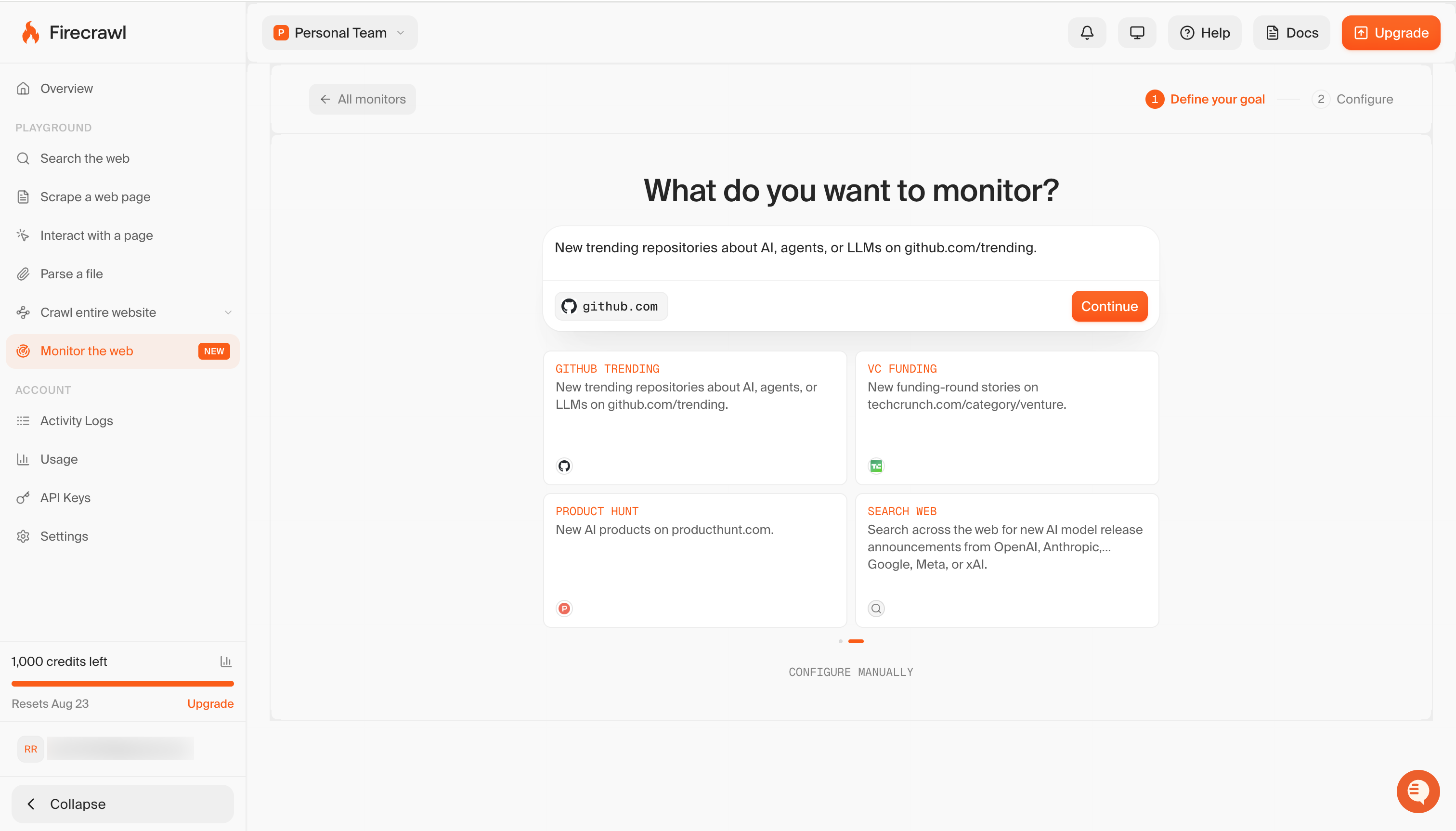
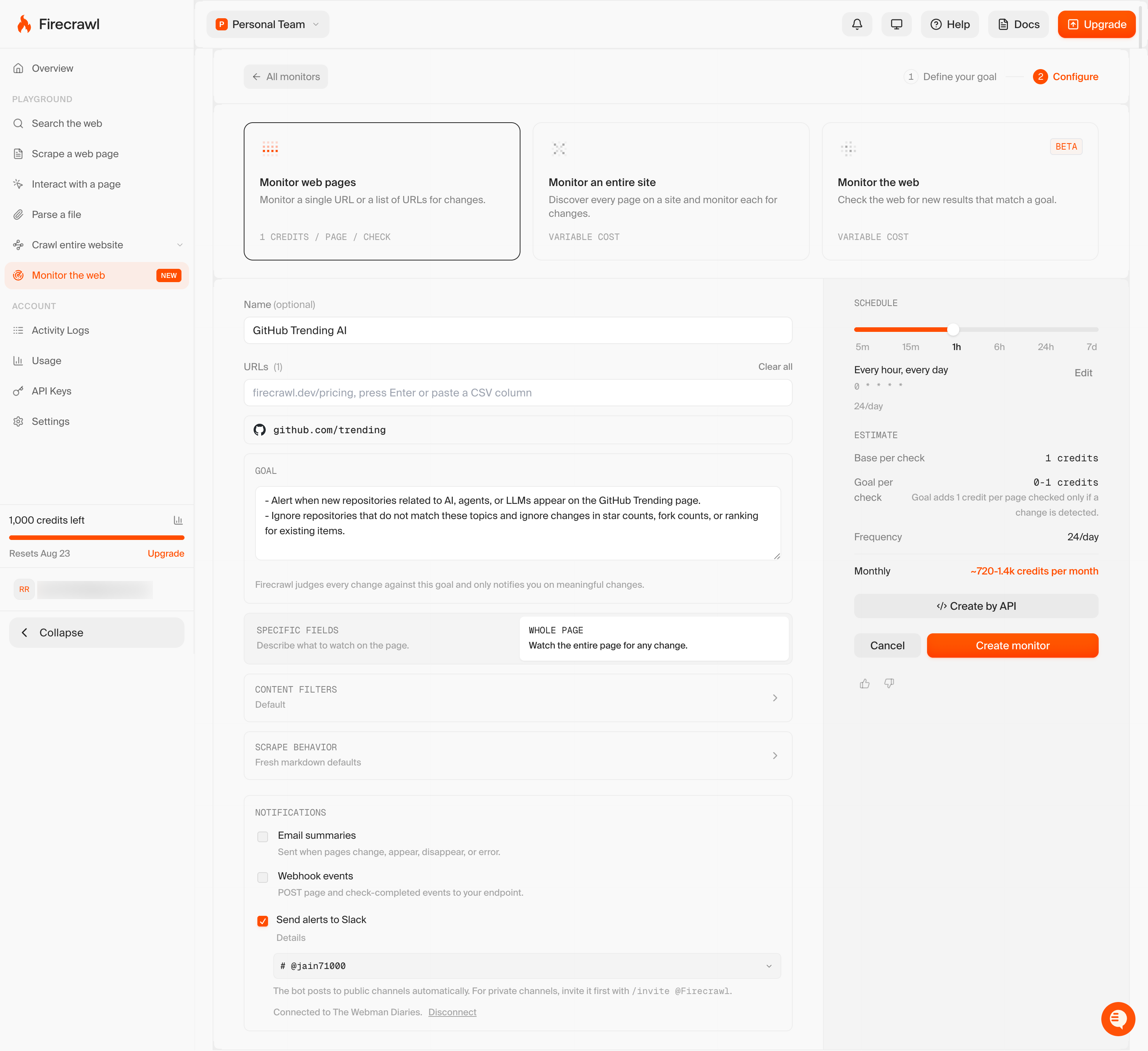
- Configure the monitor: Set the name, schedule, and goal. Firecrawl judges every change against the goal and only notifies you on meaningful ones. Under Notifications, click Receive alerts in Slack.
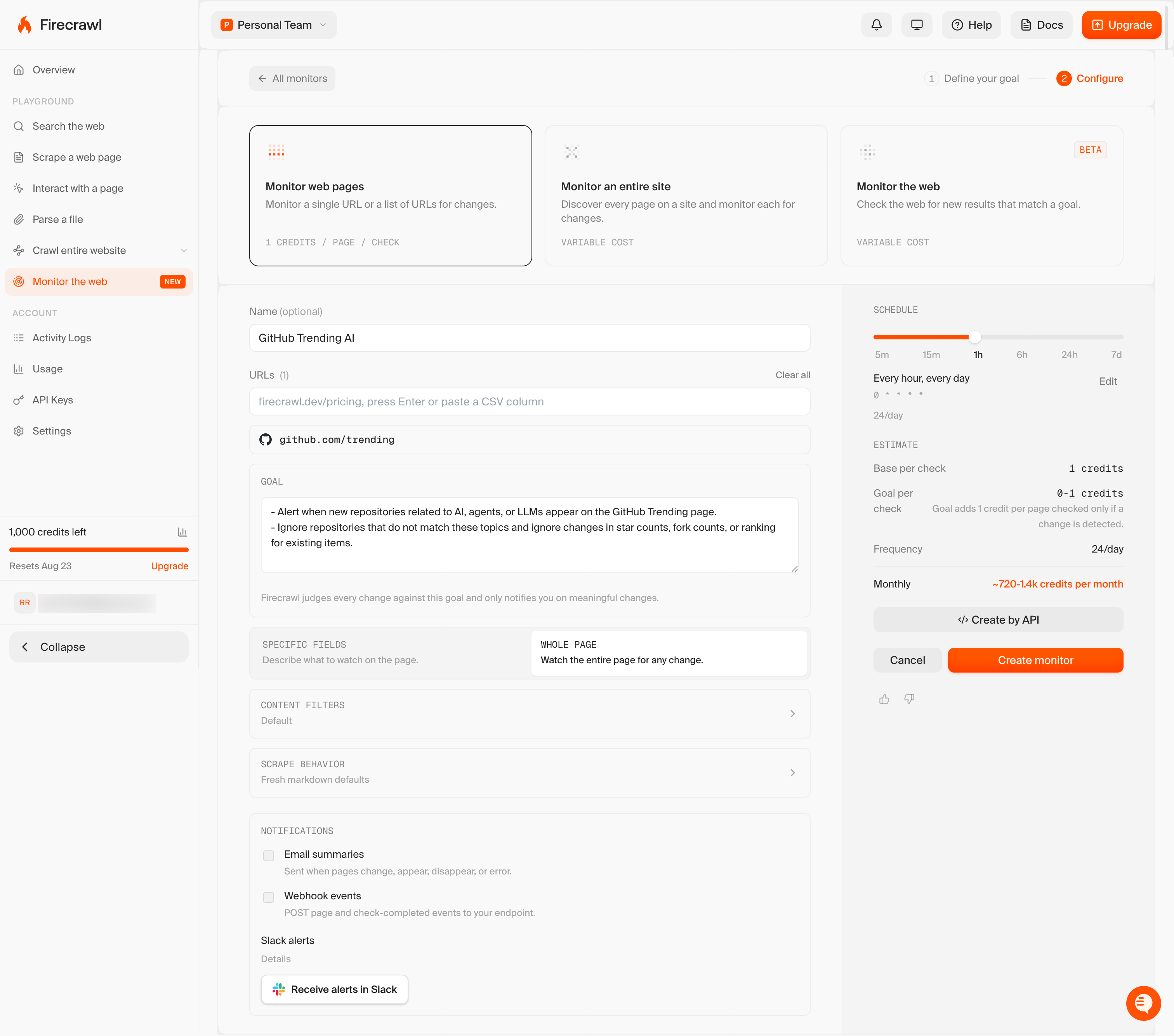
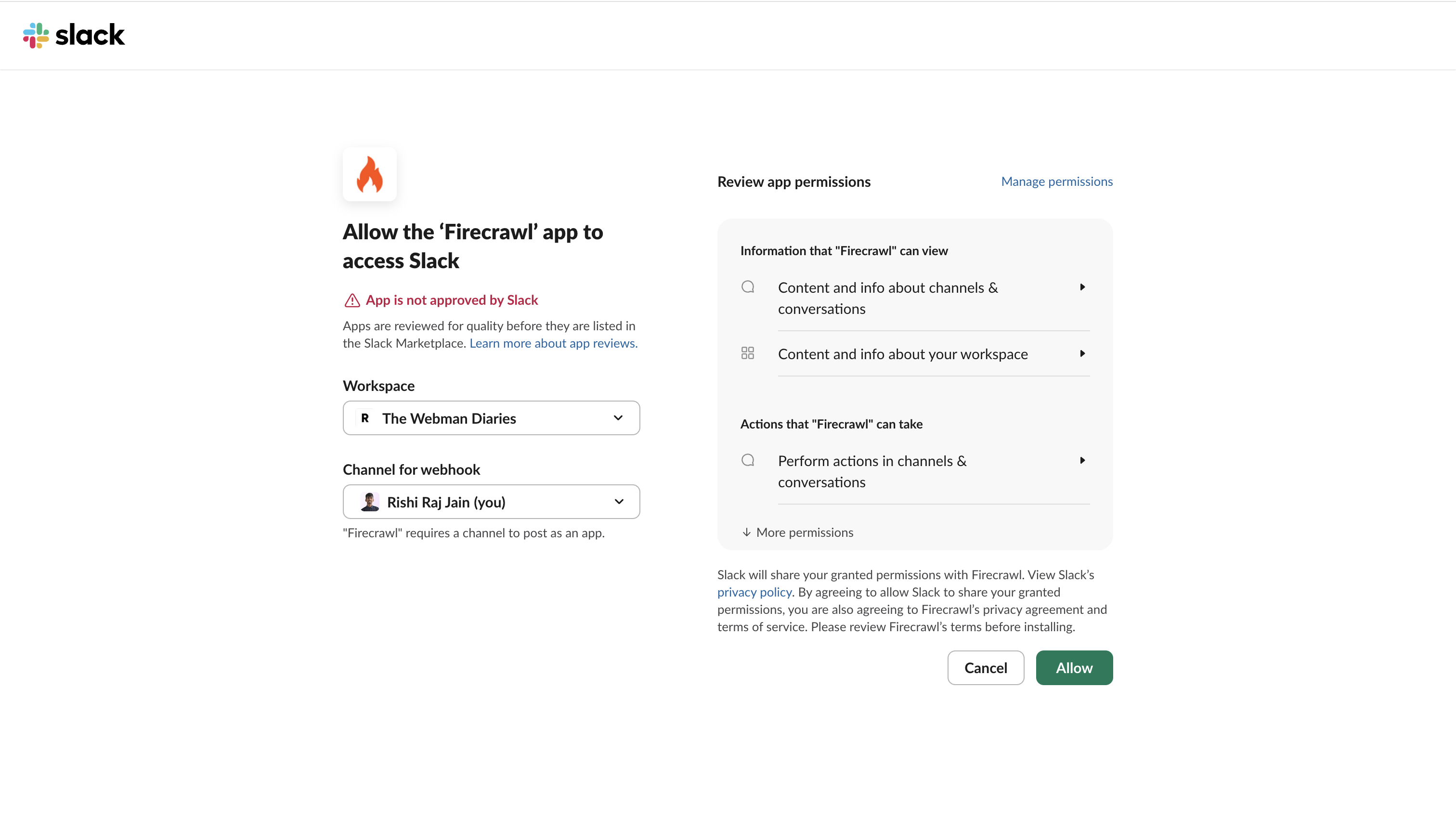
- Authorize Slack: Pick the workspace and channel, then click Allow.
- Confirm and create: Send alerts to Slack is now checked and shows the connected channel. Click Create monitor.
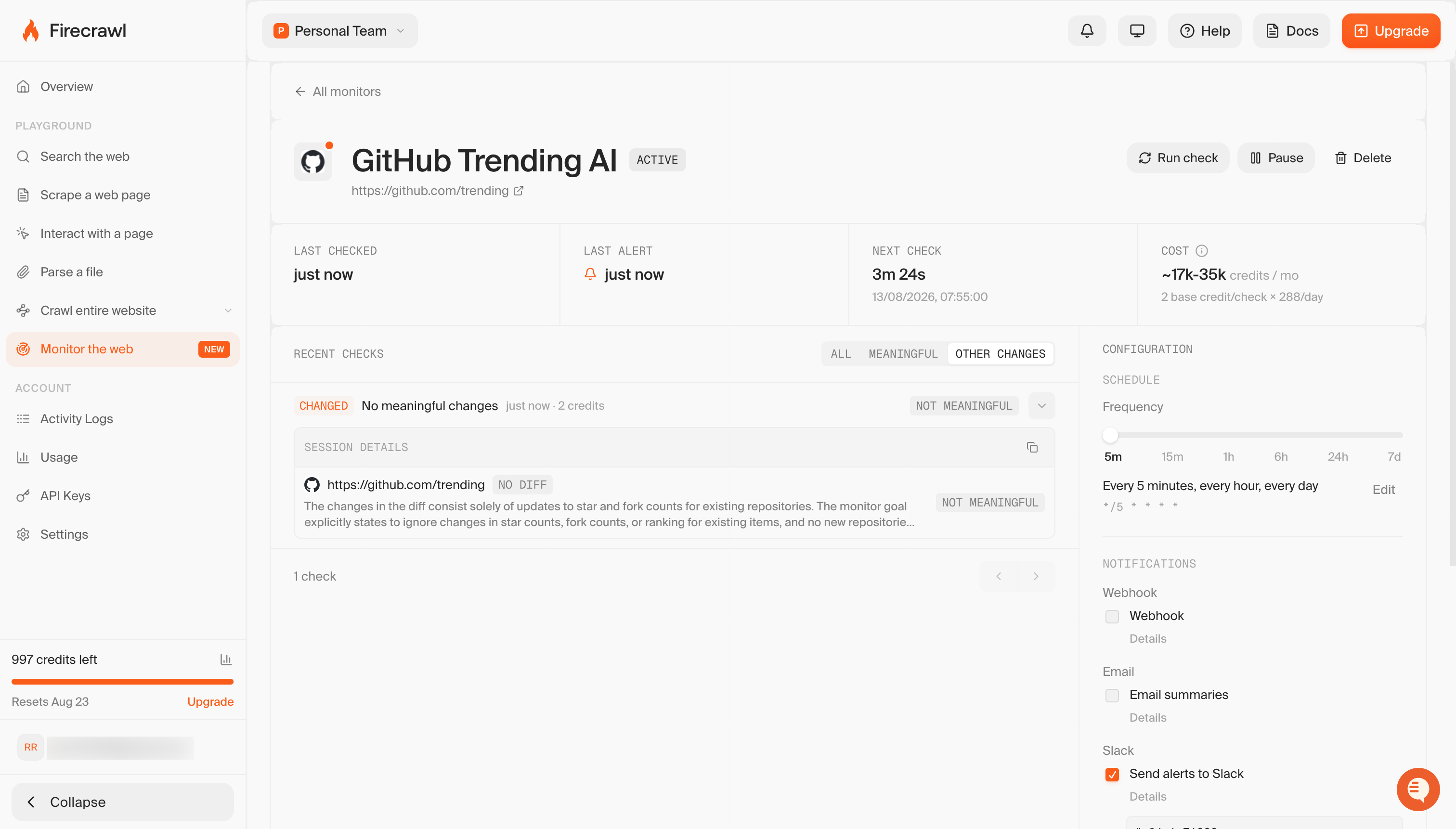
The channel fires only when a change matches the goal. If every changed page is judged insignificant and nothing was added, removed, or errored, the alert is suppressed. On the monitor's detail page, those checks show up as "No meaningful changes".
To watch the whole web for a topic instead of a fixed list of URLs, switch type: "scrape" to type: "search" and pass queries. That path is covered in the web-scale /monitor post.
Wrapping up
Web change detection comes down to two problems: JavaScript-rendered content that hides updates, and full-page comparisons that generate too much noise. Rendering in a browser fixes the first and semantic filtering fixes the second.
A monitor that fires only on relevant changes becomes a useful signal, whether you're refreshing a search index, tracking a competitor's prices, or spotting a policy update as it goes live.
For more depth, see the /monitor deep dive for targets, schedules, and output shapes and the product launch post for what the AI judge does.