Build a temporary file sharing app with Neon Object Storage

This guide builds a temporary file sharing app on Neon Object Storage (opens in a new tab), where every visitor's upload gets its own Neon project and bucket, to ensure no two visitors share files or credentials. Files are uploaded straight from the browser, share links automatically expire after an hour, and visitors can claim the project to keep their files.
You'll use Next.js, the Neon API (opens in a new tab), Lakebase Postgres (opens in a new tab) to track uploads, and Vercel Cron (opens in a new tab) to delete expired projects.
Demo
Try it at share-files-with-basket.vercel.app (opens in a new tab).
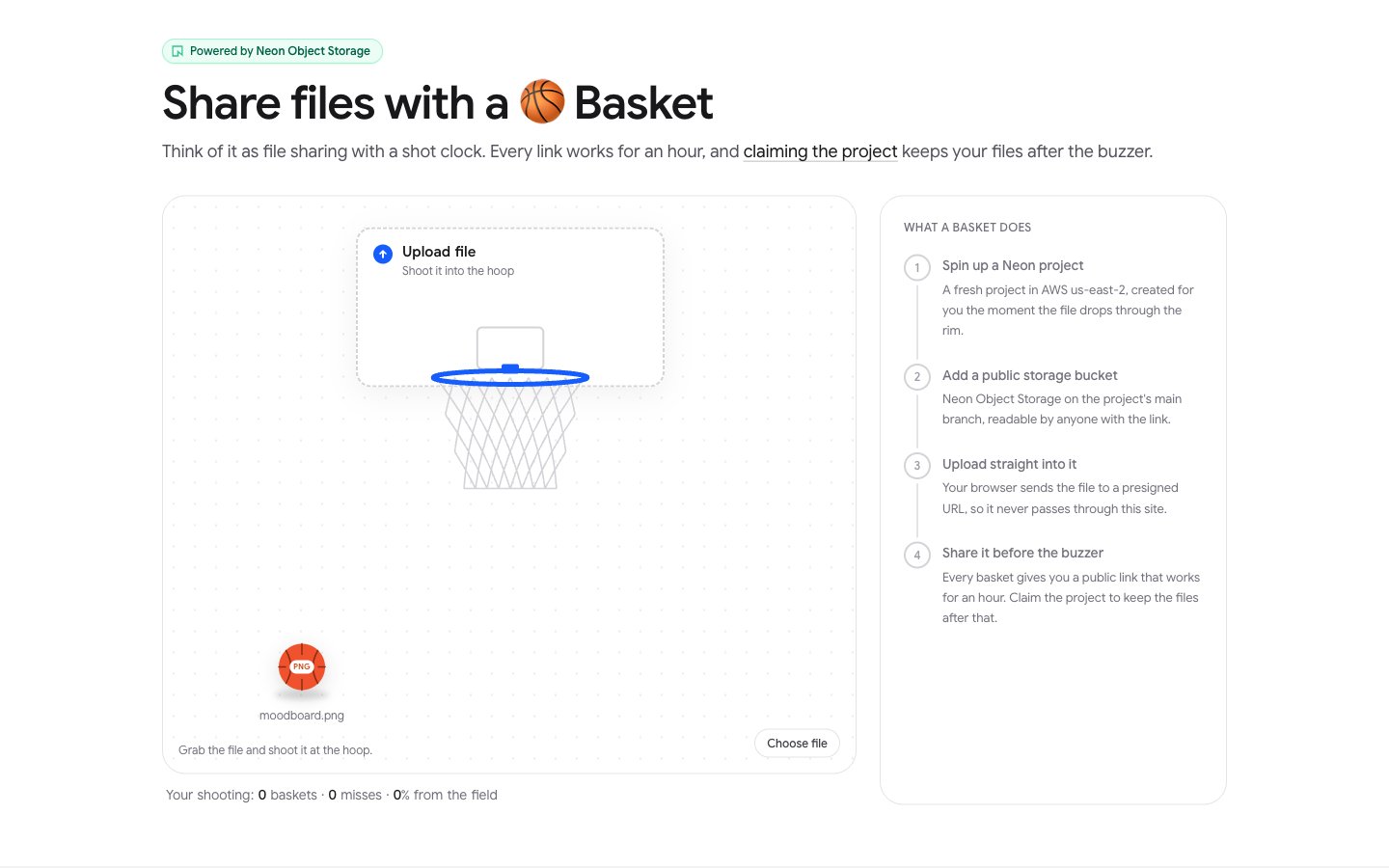
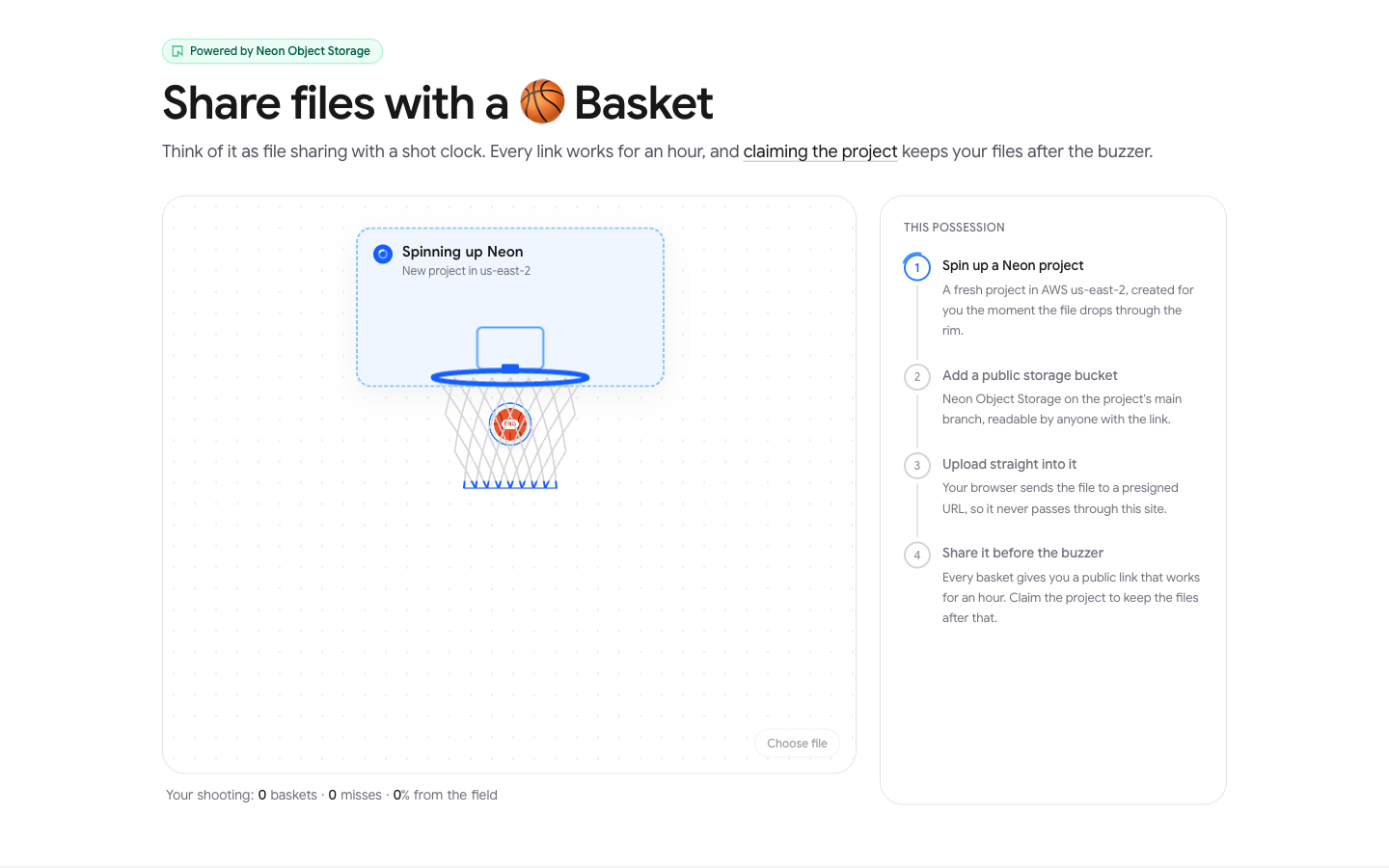
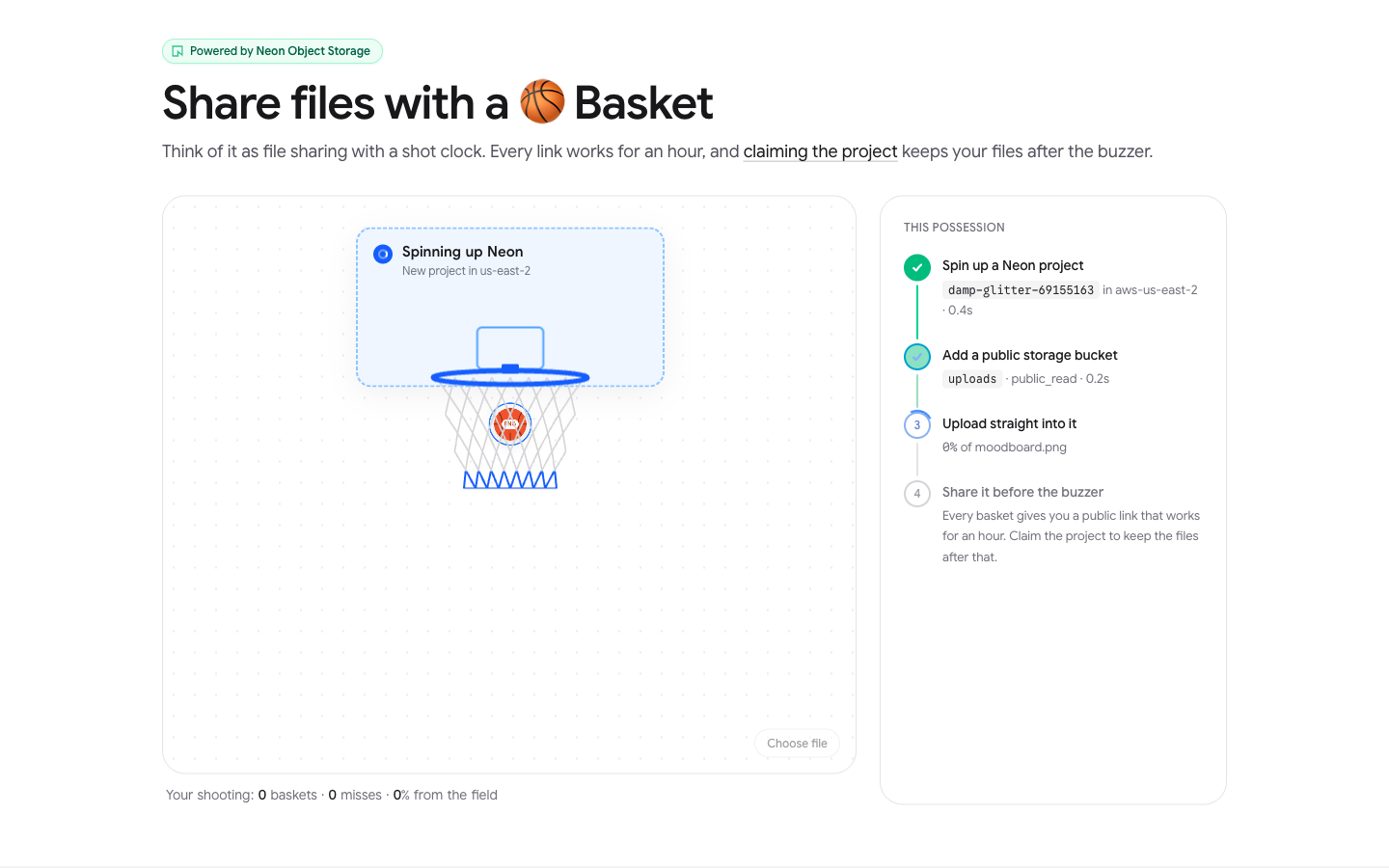
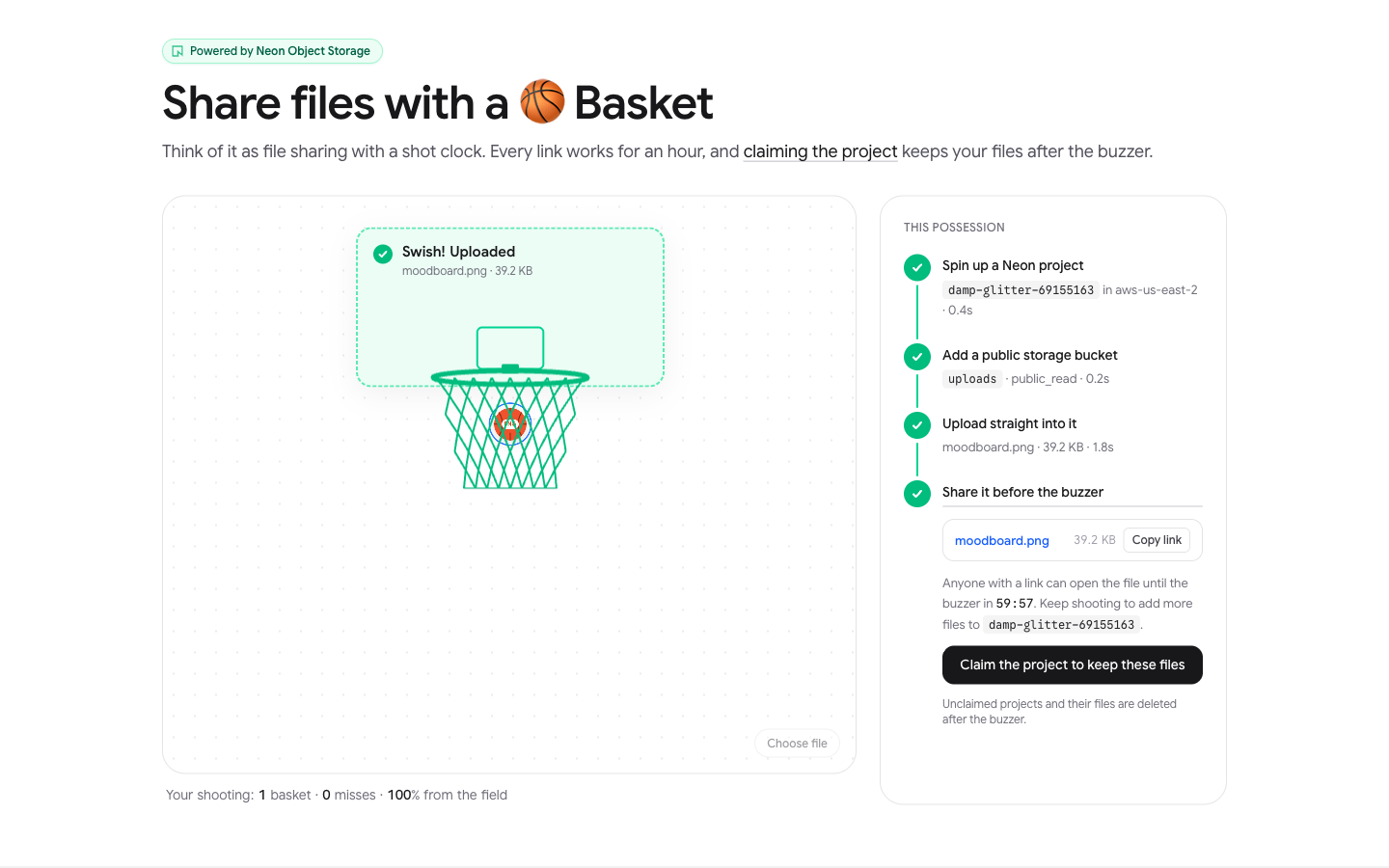
The tabs below cover each stage of a shot:
The ball carries the file type on it. Drag a file from your desktop onto the hoop, pick one with Choose file, or focus the ball and press Enter to shoot the sample image.
The file drops through the rim and the server starts creating a Neon project in AWS US East (Ohio).
The project is ready, so the server adds a public bucket called uploads and asks Neon for a presigned upload URL. In this run, the project took 0.4 seconds and the bucket 0.2 seconds.
The browser has uploaded the file straight to the bucket. You get a public link, a countdown to the one-hour buzzer, and a link to claim the project.
Why Neon Object Storage instead of Supabase Storage
The platform I'm building on this pattern gives every signed-in user their own project and bucket. Storage costs about the same on both, so the bill depends on what an idle project costs:
- Idle projects cost almost nothing on Neon. Compute scales to zero (opens in a new tab), so an unused project only pays for about 30 MB of storage, roughly a cent a month. On Supabase, every project runs its own Postgres instance, billed by the hour and never paused on paid plans, at about $9.81 a month.
- Egress is included per project. Neon includes 500 GB of network transfer (opens in a new tab) per project, shared by Postgres and Object Storage. Supabase's egress quotas cover the whole organization.
- There's no base fee. Neon's paid plans (opens in a new tab) have no monthly minimum, while Supabase Pro starts at $25.
For 1K users, that's about $52 a month on Neon against about $9.86K on Supabase. Supabase is slightly cheaper per stored GB ($0.0213 against $0.023), and it can put every user in one project with Row Level Security, but then all users share one project, one set of keys and one egress quota.
Cost breakdown for 1K users
Prices are from the  Neon and
 Supabase pricing pages as of November 2026. The estimate assumes:
- 1K signed-in users, each with their own project and bucket
- One shared project for the app database and auth, on both platforms
- Each user shares 30 files a month at 8 MB on average, so 240 GB uploaded across all users
- Every file downloaded 5 times within its hour, so 1.2K GB of downloads a month
- Files deleted after an hour, so about 0.33 GB stored on average (240 GB × 1 hour / 730 hours)
| Neon (Scale) | Supabase (Pro) | |
|---|---|---|
| Base plan | $0, no monthly minimum | $25, includes $10 of compute credits |
| Auth for 1K users | $0 (Managed Better Auth, up to 1M MAU per project) | $0 (100K MAU included) |
| Shared app database compute | $40.52 (0.25 CU always on, 182.5 CU-hours at $0.222) | $0 (Micro instance covered by the credits) |
| Per-user project compute | $0.93 (each scales to zero a minute after it's created) | $9.81K (1K Micro instances at $0.01344/hour, always on) |
| Postgres storage | $10.68 (30.5 GB at $0.35/GB-month: about 30 MB per user project plus the app database) | $0 (8 GB disk included per project) |
| Backups and restore | Under $0.10 (instant restore at $0.20/GB-month on a few MB of changes) | $0 (daily backups included) |
| Object storage | $0.01 (0.33 GB at $0.023/GB-month, no per-request charge) | $0 (100 GB included) |
| Downloads (egress) | $0 (500 GB included per project) | $21.30 to $85.50 |
| Total | about $52 | about $9.86K to $9.92K |
Supabase's egress quotas are 250 GB uncached and 250 GB cached for all 1K projects together. If the CDN caches every download after the first, 240 GB is uncached (inside the quota) and 960 GB is cached, so 710 GB × $0.03 = $21.30. If nothing is cached, 950 GB × $0.09 = $85.50.
A few things to keep in mind:
- Neon's Free and Launch plans include 100 projects, so 1K users needs Scale, which includes 1K and raises the limit on request.
- Scale is also the only plan where the one-minute scale-to-zero in
createProjectapplies. On Free and Launch, compute suspends after five minutes idle. - The per-user compute line assumes all 1K users signed up this month. Projects from earlier months stay suspended and cost only their storage.
- Supabase with every user in one shared project comes to about $46 to $110 a month.
Prerequisites
- Node.js 24 or newer
- A Neon (opens in a new tab) account, with admin access to the organization the upload projects go in
- A Vercel (opens in a new tab) account
Create the Next.js application
The animation alone is a few hundred lines, so clone the project and walk through the parts that talk to Neon:
git clone https://github.com/rishi-raj-jain/share-files-with-basketcd share-files-with-basketnpm installThe key dependencies are:
@neondatabase/serverlessto query Postgres over HTTP from the API routes@dotenvx/dotenvxto load.env.localfor the dev server and the migration script
Object Storage is reached through the Neon API with plain fetch, so there's no S3 SDK, and the server holds a Neon API key instead of storage credentials.
The project has the following structure:
share-files-with-basket├── scripts│ └── migrate.mjs creates the tables└── src ├── app/api │ ├── cron/cleanup/route.ts deletes expired projects │ ├── drops/route.ts provisions and presigns │ └── session/route.ts restores a session on reload ├── components │ └── hoop-uploader.tsx uploads with progress └── lib ├── client-ip.ts hashed IP for daily limits ├── db.ts control database client ├── limits.ts caps, region, content types ├── neon-api.ts Neon API wrapper └── session.ts session cookie lookupsConfigure Neon with the Neon CLI
There are two kinds of Neon projects in this app:
- One control project that you create once. Its Postgres database records which project belongs to which browser and every shared file.
- Many upload projects that the app creates through the Neon API, one per visitor. Each has a bucket.
Install the Neon CLI (opens in a new tab) and log in, which opens a browser to sign in or sign up:
npm i -g neon@latestneon loginFrom the project directory, create the control project and link (opens in a new tab) the directory to it:
neon link --no-configPick the organization the upload projects should go in, choose + Create new project, and pick AWS US East (Ohio) (aws-us-east-2), the region (opens in a new tab) the upload projects use. The CLI writes a .neon file and pulls DATABASE_URL and DATABASE_URL_UNPOOLED into .env.local. --no-config skips creating a neon.ts, since the control project only needs Postgres.
Create an organization API key
The app manages upload projects through the Neon API, so it needs an API key (opens in a new tab) owned by your organization. Your organization ID is the orgId in .neon (or run neon orgs list). Create the key with neon api-keys (opens in a new tab) and append it to .env.local:
echo "NEON_API_KEY=$(neon api-keys create --name share-files --org-id org-... -o json | jq -r .key)" >> .env.localThe key is shown only once, so the command writes it straight to the file. It reaches every project in the organization, including ones created later, so give the upload projects an organization of their own. Creating it needs organization admin permissions.
Finally, add the organization ID and two random secrets. .env.local then looks like this:
DATABASE_URL=postgresql://...-pooler.us-east-2.aws.neon.tech/neondb?sslmode=requireDATABASE_URL_UNPOOLED=postgresql://....us-east-2.aws.neon.tech/neondb?sslmode=requireNEON_API_KEY=napi_...NEON_ORG_ID=org-...CRON_SECRET=a-long-random-stringIP_SALT=another-long-random-stringGenerate CRON_SECRET and IP_SALT with openssl rand -hex 32. CRON_SECRET protects the cleanup route, and IP_SALT salts the visitor IP hashes the app stores.
Create the database schema
scripts/migrate.mjs creates two tables in the control database. drops tracks each upload project, and uploads tracks each file shared from it:
The migration is safe to run repeatedly, and it connects with DATABASE_URL_UNPOOLED because schema changes belong on a direct connection, not the pooler. Run it with:
npm run db:migrateBuild a Neon API client
Shared constants are in src/lib/limits.ts:
export const MAX_BYTES = 10 * 1024 * 1024export const CLAIM_WINDOW_SECONDS = 60 * 60export const MAX_FILES_PER_PROJECT = 20export const PROJECT_PREFIX = 'hoop-drop-'export const BUCKET = 'uploads'export const REGION = 'aws-us-east-2'In the code above:
MAX_BYTEScaps each file at 10 MB, andMAX_FILES_PER_PROJECTcaps each project at 20 files.CLAIM_WINDOW_SECONDSis the one-hour window for both the share link and the claim link.PROJECT_PREFIXnames every upload project, so the cleanup cron can find the projects it owns.
Every Neon API call in the app goes through one helper in src/lib/neon-api.ts:
const API = 'https://console.neon.tech/api/v2'8 collapsed lines
export class NeonApiError extends Error { constructor( public status: number, message: string, ) { super(message) }}async function call<T>(path: string, init: { method?: string; body?: unknown } = {}): Promise<T> { // 423 means another operation still holds the project lock, so wait and retry. for (let attempt = 0; attempt < 40; attempt++) { const res = await fetch(API + path, {8 collapsed lines
method: init.method ?? 'GET', headers: { authorization: `Bearer ${process.env.NEON_API_KEY}`, accept: 'application/json', ...(init.body ? { 'content-type': 'application/json' } : {}), }, body: init.body ? JSON.stringify(init.body) : undefined, cache: 'no-store', }) if (res.status === 423) { await new Promise((r) => setTimeout(r, 250)) continue } const text = await res.text() if (!res.ok) { let message = `Neon API ${res.status}` try { message = JSON.parse(text).message ?? message } catch {} throw new NeonApiError(res.status, message) } return (text ? JSON.parse(text) : null) as T } throw new NeonApiError(423, 'Neon project stayed locked for too long')}In the code above:
- A new project briefly answers
423 Lockedwhile its creation operations finish. Retrying every 250 ms, up to 40 times, turns that into a short delay instead of a failed upload. - Any other error is thrown as a
NeonApiErrorthat keeps the HTTP status, so callers can tell "this project is gone" (a 4xx) apart from "Neon had a problem" (a 5xx).
Provision a Neon project per visitor
A new upload project is one POST /projects (opens in a new tab) call:
export async function createProject(suffix: string) { const data = await call<{ project: { id: string }; branch: { id: string } }>('/projects', { method: 'POST', body: { project: { name: `${PROJECT_PREFIX}${suffix}`, region_id: REGION, org_id: process.env.NEON_ORG_ID, default_endpoint_settings: { suspend_timeout_seconds: 60 }, }, }, }) return { projectId: data.project.id, branchId: data.branch.id }}In the code above:
org_idcreates the project in your organization, so the cron can list and delete it and the visitor can claim it.suspend_timeout_seconds: 60scales the project's Postgres compute to zero after a minute idle, since the app never queries that database.- Object Storage is attached to a branch, so the app keeps the default branch's
branchIdfor every call that follows.
Create a public Object Storage bucket
Object Storage comes up shortly after the project does. The app polls the branch's storage state endpoint (opens in a new tab) until it reports an S3 endpoint:
export async function waitForStorage(projectId: string, branchId: string) { for (let attempt = 0; attempt < 40; attempt++) { try { const s = await call<{ enabled: boolean; s3_endpoint?: string }>(`/projects/${projectId}/branches/${branchId}/storage`) if (s.enabled && s.s3_endpoint) return s.s3_endpoint } catch (err) { if (!(err instanceof NeonApiError) || err.status !== 404) throw err } await new Promise((r) => setTimeout(r, 250)) } throw new Error('Object storage did not come up in time')}The endpoint returns 404 until the branch is registered with Object Storage, so the loop retries every 250 ms for up to 10 seconds. It gives up after that because a 404 can also mean the region has no Object Storage. Any other error stops it right away.
Once storage is up, the app creates a bucket (opens in a new tab) with public_read access:
export function createPublicBucket(projectId: string, branchId: string) { return call(`/projects/${projectId}/branches/${branchId}/buckets`, { method: 'POST', body: { name: BUCKET, access_level: 'public_read' }, })}In a public_read bucket (opens in a new tab), anyone can read an object without a credential, while writes still need one. So the share link is just the object's address on the branch's storage endpoint:
const publicUrlFor = (endpoint: string, key: string) => `${endpoint}/${BUCKET}/${key.split('/').map(encodeURIComponent).join('/')}`The key starts with six random bytes, so links can't be guessed by walking file names:
function safeKey(name: string) { const clean = name .normalize('NFKD') .replace(/[^\w.-]+/g, '-') .replace(/^-+|-+$/g, '') .slice(0, 80) return `${randomBytes(6).toString('hex')}/${clean || 'file'}`}A shared link ends up looking like https://br-late-butterfly-b4gl8qwa.storage.c-6.us-east-2.aws.neon.tech/uploads/7b98684a6ad2/moodboard.png.
Upload files directly with presigned URLs
The file never passes through the Next.js server. The server asks Neon for a presigned upload URL (opens in a new tab) and passes it to the browser:
export function presignUpload(projectId: string, branchId: string, key: string, contentType: string) { return call<{ url: string method: string headers: Record<string, string> expires_at: string }>(`/projects/${projectId}/branches/${branchId}/buckets/${BUCKET}/objects/${encodeURIComponent(key)}/presign`, { method: 'POST', body: { operation: 'upload', content_type: contentType, expires_in_seconds: 600, }, })}In the code above:
operation: 'upload'asks for a URL the browser can write one object to.content_typeis bound into the signature, so the browser's PUT must send exactly thatContent-Type, and the bucket serves the object with it.expires_in_seconds: 600gives the browser ten minutes to start the upload.- The response carries the method and any headers the upload must send, so the client doesn't hardcode either.
On the client, src/components/hoop-uploader.tsx sends the file with XMLHttpRequest instead of fetch, because XHR reports upload progress and that's what fills the net:
function putWithProgress(upload: Ready['upload'], file: File, onProgress: (p: number) => void) { return new Promise<void>((resolve, reject) => { const xhr = new XMLHttpRequest() xhr.open(upload.method, upload.url) for (const [k, v] of Object.entries(upload.headers)) xhr.setRequestHeader(k, v) xhr.upload.onprogress = (e) => e.lengthComputable && onProgress(e.loaded / e.total) xhr.onload = () => (xhr.status >= 200 && xhr.status < 300 ? resolve() : reject(new Error(`Storage returned ${xhr.status}. Shoot again.`))) xhr.onerror = () => reject(new Error('The upload dropped. Shoot again.')) xhr.send(file) })}This keeps the function out of the data path. A Vercel function accepts request bodies up to 4.5 MB, but here a 10 MB file costs it only a few API calls.
Restrict the content types the bucket serves
A public bucket on a Neon domain serves whatever Content-Type you presigned the upload with. If a visitor uploads an HTML or SVG file and the bucket serves it as text/html or image/svg+xml, the browser runs its scripts. So the app keeps an allowlist of types that are safe to render inline, and stores everything else as a download:
export const INLINE_TYPES = ['image/png', 'image/jpeg', 'image/gif', 'image/webp', 'image/avif', 'image/heic', 'image/heif', 'application/pdf', 'text/plain', 'text/markdown', 'text/csv']export const DOWNLOAD_TYPE = 'application/octet-stream'export function storedType(type: string) { return INLINE_TYPES.includes(type) ? type : DOWNLOAD_TYPE}The client calls storedType() too, but the server runs it again before presigning, so a modified client can't ask for text/html.
Transfer project ownership with a claim link
The claim link turns a throwaway project into one the visitor keeps. The app creates a transfer request (opens in a new tab) that lasts as long as the share window:
export function createTransferRequest(projectId: string, ttlSeconds: number) { return call<{ id: string; expires_at: string }>(`/projects/${projectId}/transfer_requests`, { method: 'POST', body: { ttl_seconds: ttlSeconds }, })}Then it builds a claim URL in the Neon Console from the project ID, the transfer request ID, and a return URL:
const claimUrl = `https://console.neon.tech/app/claim?p=${projectId}&tr=${transfer.id}&ru=${encodeURIComponent(origin)}`In the code above:
pandtridentify the project and the transfer request.ruis where Neon sends the visitor back after the claim, here the app itself.
When a visitor opens the link, they sign in to Neon (or sign up), pick an organization, and the project moves there with its bucket and every file in it. A transfer request works once, and anyone holding the URL can use it, so the app only ever returns it to the browser that created the project.
The app uses the transfer request's expires_at as the project's expiry in drops, so the countdown in the UI and the end of the claim window are the same moment.
Build the upload route
src/app/api/drops/route.ts runs every step above in order and streams progress to the browser as NDJSON (opens in a new tab), one event per step. That's what moves the ball through the tabs in the demo:
return ndjson( async (send) => { let projectId: string | null = null try { let t = Date.now() const created = await createProject(randomBytes(3).toString('hex')) projectId = created.projectId const { branchId } = created await sql` insert into drops (project_id, branch_id, ip_hash, owner_hash, file_name, file_type, file_size, expires_at) values (${projectId}, ${branchId}, ${ip}, ${ownerHash(token)}, ${name}, ${type}, ${size}, now() + make_interval(secs => ${CLAIM_WINDOW_SECONDS})) ` send({4 collapsed lines
step: 'project', projectId, region: REGION, ms: Date.now() - t, }) t = Date.now() const endpoint = await waitForStorage(projectId, branchId) await createPublicBucket(projectId, branchId) send({ step: 'bucket', ms: Date.now() - t }) const [presign, transfer] = await Promise.all([presignUpload(projectId, branchId, key, type), createTransferRequest(projectId, CLAIM_WINDOW_SECONDS)]) const publicUrl = publicUrlFor(endpoint, key) const claimUrl = `https://console.neon.tech/app/claim?p=${projectId}&tr=${transfer.id}&ru=${encodeURIComponent(origin)}` await sql` update drops set s3_endpoint = ${endpoint}, claim_url = ${claimUrl}, public_url = ${publicUrl}, expires_at = ${transfer.expires_at} where project_id = ${projectId} ` await sql` insert into uploads (project_id, file_name, file_type, file_size, public_url) values (${projectId}, ${name}, ${type}, ${size}, ${publicUrl}) ` send({12 collapsed lines
step: 'ready', reused: false, projectId, region: REGION, upload: { url: presign.url, method: presign.method, headers: presign.headers, }, publicUrl, claimUrl, expiresAt: transfer.expires_at, }) } catch (err) { console.error('drop failed', err) send({ step: 'error', message: 'Neon blocked that one. Take another shot.', }) if (projectId) { // Drop the row too, so a shot Neon blocked doesn't use up one of today's projects. // If the delete above failed, the cron still finds the project by its name prefix. await deleteProject(projectId).catch(() => {}) await sql`delete from drops where project_id = ${projectId}`.catch(() => {}) } } }, sessionCookie(token, CLAIM_WINDOW_SECONDS),)In the code above:
- The
dropsrow is written as soon as the project exists, before storage is ready. If anything after that fails, the route still knows which project to delete. - The presigned upload and the transfer request don't depend on each other, so they run in parallel.
- The
readyevent carries everything the browser needs: the upload URL and headers, the public link, the claim link and the expiry. - On failure, the route deletes the half-built project and its row. If the delete fails too, the project still carries the
hoop-drop-prefix, so the cleanup cron removes it.
sessionCookie sets an httpOnly cookie that lasts as long as the window, and the database stores only its SHA-256 hash in owner_hash. If that cookie already has a project with more than two minutes left, the route skips straight to presigning, so later uploads land in the same bucket, up to 20 files.
Rate-limit project creation
Each new project is a real Neon project in your organization, so the route checks two limits before creating one:
const PER_IP_PER_DAY = Number(process.env.DROPS_PER_IP_PER_DAY ?? 3)const MAX_ACTIVE = Number(process.env.MAX_ACTIVE_DROPS ?? 25)// ...const ip = ipHash(request)const [{ mine, open }] = (await sql` select count(*) filter (where ip_hash = ${ip} and created_at > now() - interval '1 day')::int as mine, count(*) filter (where deleted_at is null and created_at > now() - interval '2 hours')::int as open from drops`) as { mine: number; open: number }[]if (mine >= PER_IP_PER_DAY) return Response.json({ error: `That's ${PER_IP_PER_DAY} new projects today, the daily limit. Come back tomorrow.` }, { status: 429 })if (open >= MAX_ACTIVE) return Response.json({ error: 'Every court is taken. Shoot again in a few minutes.' }, { status: 503 })In the code above:
minecounts the projects this visitor created in the last day. The default is 3.opencounts projects that haven't been deleted yet across all visitors. The default cap is 25, which keeps the organization well under a plan's project limit.
The visitor is a SHA-256 hash of their IP, salted with IP_SALT, so the database never stores a raw IP. src/lib/client-ip.ts counts an IPv6 /64 as one visitor, so cycling through addresses in one block doesn't get past the daily limit.
Delete expired projects with Vercel Cron
vercel.json pins the functions next to the database and schedules the cleanup every ten minutes:
{ "regions": ["cle1"], "crons": [{ "path": "/api/cron/cleanup", "schedule": "*/10 * * * *" }]}cle1 (Cleveland) is the closest Vercel region to AWS us-east-2, so Neon API calls and queries take a short hop.
The cleanup route doesn't trust the drops table to know which projects exist. It asks Neon instead, by listing every project (opens in a new tab) in the organization with the hoop-drop- prefix:
export function listDropProjects() { return call<{ projects: { id: string; name: string; created_at: string }[] }>(`/projects?org_id=${process.env.NEON_ORG_ID}&search=${PROJECT_PREFIX}&limit=400`).then((d) => d.projects.filter((p) => p.name.startsWith(PROJECT_PREFIX)), )}In the code above:
org_idscopes the list to your organization, andlimit=400fetches up to 400 projects in one request.searchmatches partial names, so thestartsWithfilter keeps only names that begin with the prefix. A project namedmy-hoop-drop-testis never touched.
Then the route deletes (opens in a new tab) every project older than the one-hour window:
9 collapsed lines
import { sql } from '@/lib/db'import { CLAIM_WINDOW_SECONDS } from '@/lib/limits'import { deleteProject, listDropProjects, NeonApiError } from '@/lib/neon-api'export const maxDuration = 300// Runs every 10 minutes (vercel.json) and only deletes projects older than the// one-hour window, so nothing goes before its buzzer. A claimed project has// already moved to the claimer's org, so it no longer shows up in the listing.export async function GET(request: Request) { if (request.headers.get('authorization') !== `Bearer ${process.env.CRON_SECRET}`) return new Response('Unauthorized', { status: 401 }) const cutoff = Date.now() - CLAIM_WINDOW_SECONDS * 1000 const projects = await listDropProjects() const expired = projects.filter((p) => new Date(p.created_at).getTime() < cutoff) const deleted: string[] = [] for (const p of expired) { try { await deleteProject(p.id) deleted.push(p.id) } catch (err) { if (err instanceof NeonApiError && err.status === 404) deleted.push(p.id) else console.error('cleanup failed', p.id, err) } } // Close out every past-expiry row: deleted here, claimed, or already gone. const stillOurs = projects.filter((p) => !deleted.includes(p.id)).map((p) => p.id) await sql` update drops set deleted_at = now() where deleted_at is null and expires_at < now() and not (project_id = any(${stillOurs})) ` return Response.json({ checked: projects.length, deleted })}In the code above:
- Vercel sends
Authorization: Bearer <CRON_SECRET>(opens in a new tab) with every cron request when theCRON_SECRETenvironment variable is set, so the route rejects anyone else who calls it. - A 404 from Neon counts as deleted, since the project is already gone. Any other error is logged, and the next run tries again.
stillOursis every listed project that wasn't just deleted. A past-expiry row whose project isn't in that list is marked deleted, whether this run deleted it or the visitor claimed it.
Listing from Neon handles three cases without extra code:
- A project that was claimed has moved to the visitor's organization, so it never shows up in the listing and is never deleted.
- A project whose creation failed halfway still carries the prefix, so it gets deleted even if its
dropsrow was never written. - Deleting a project deletes its bucket and every object in it. There's no per-object cleanup.
Neon keeps a deleted project recoverable for 7 days (opens in a new tab), at no storage cost, before it's gone for good. Anyone with admin access to your organization can bring the project and its files back during that week, so keep that in mind if you promise visitors their files are deleted.
Deploy to Vercel
To deploy:
- Fork the GitHub repository (opens in a new tab).
- Create a New Project in the Vercel Dashboard and link it to your fork.
- In Settings, set the Environment Variables from your
.env.local, includingCRON_SECRET. AddDROPS_PER_IP_PER_DAYandMAX_ACTIVE_DROPSto change the default limits. - Deploy.
The cron in vercel.json registers on the first production deployment. Run npm run db:migrate against your control database before the first upload if you haven't already.